

Vibe Coding a Collaborative Editor with Comment Support with Nuxt UI and Jazz

I first started this article with the intention of teaching you how to combine Nuxt UI's Editor component with Jazz's collaborative rich text model to build a real-time shared editing experience in Nuxt.
But then I realized that I was using AI to do a lot of the heavy lifting for me. Given the day and age we live in, you'd likely use AI to do the same thing. So instead of walking you through the text step by step, I'm going to take a different approach.
Here's the plan:
- I'll start by explaining why I wanted to build this in the first place.
- Next I'll show off the final result and show you how you can use it for yourself if you'd like.
- Then I'll give you a list of takeaways on building with AI that:
- I learned during the process
- I've learned in the past but came up during this build
Why I Thought Building the Nuxt UI Collaborative Editor Was a Good Idea
Sure there are some off the shelf solutions for rich text editing with comments, but I'm pretty married to the Nuxt ecosystem. So I said, "why not!? Let's give it a go!"
Furthermore, the control over the source code means I can also extend it in ways that I couldn't do with a pre-built solution.
A Nuxt UI Collaborative Editor with Comment Support: the Final Result
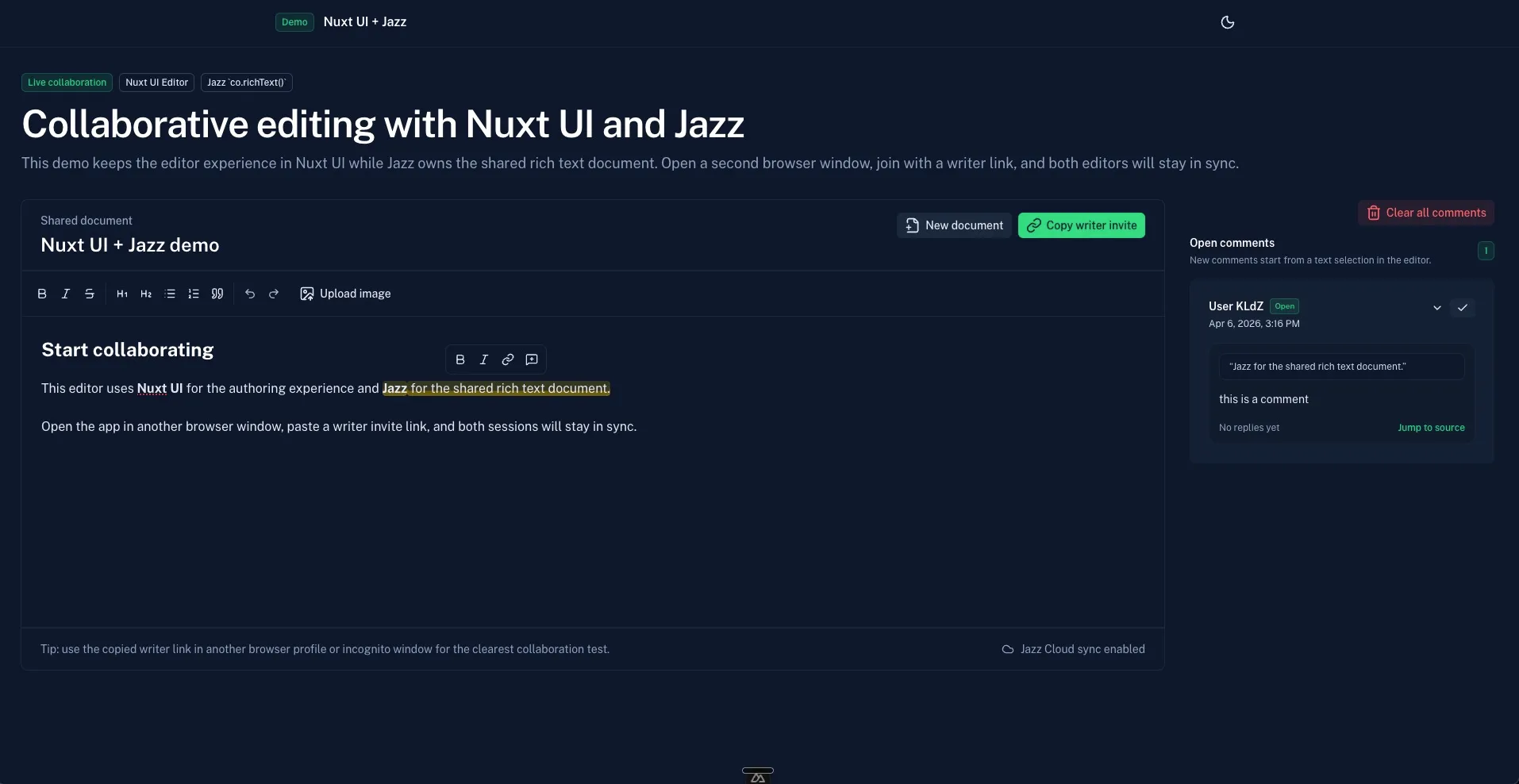
So what exactly did I build? Here's what's included in the final result:
- A Nuxt UI Editor component with a toolbar that handles the edit and display of rich text
- Support for multiple users to edit the same document together in real-time (courtesy of Jazz.)
- Support for comments tied to specific highlighted text in the editor
- Image upload, sizing, and alignment support
- A editing optimized layout that keeps the editor front and center while showing comments conditionally in a sidebar.
- The ability to add replies to comments
- The ability to mark comments as "resolved"
How to Use the Nuxt UI Collaborative Editor with Comment Support
If you want to use it for yourself, you can clone the demo repository, get an API key for Jazz at jazz.tools, and run it locally:
git clone https://github.com/danielkellyio/nuxt-jazz-collaborative-editor-with-comments.git
cd nuxt-jazz-collaborative-editor-with-comments
npm install
npm run dev
Feel free to use it as a starting point for your own projects or copying and pasting the code existing codebases.
A List of Takeaways on Building with AI
While AI is a great tool, it's not 100% intuitive on how to use it to your advantage. unlearn.dev is a great resource for mastering the art of wielding it effectively. It's a full collection of workflows and strategies. Until then, here's a short list of takeaways on building with AI specfic to this project.
Choosing the right tools for the job goes a long way.
What do I mean? Well, I've never used Jazz before but given the exact use case it's meant to solve (multi-user real-time data syncing), it was a great fit for the job. (Thanks Alexander Opalic for turning me on to it!). The library's llms.txt was easy to pass on to my AI agent. I'm often tempted to reach for built-in REST api endpoints via Nitro, but it's worth exlporing new depenedencies when a better fit is available.
Telling the Agent to iterate using the browser
The editor setup was super simple, it's just the Nuxt UI editor component with it's companion Toolbar. Making it collaborative was also extremely easy with Jazz. However, things started getting a little harrier when I attempted to add comments support. The AI agent wanted to take the easiest path even though it didn't result in the best UI/UX.
So I told it: "Iterate until it's a notion style commenting UI. localhost:3000 Use the browser."
This forced it to:
- Do more of the work autonomously while I worked on other things
- Gave it tools to check it's own work
- And gave it a clearer goal without a lot of extra context creation on my part
That leads me to...
Mention existing projects that are similar to the one you're building
Just like I mentioned "Notion", if there's another popular solution similar to what you're attempting, defitintely mention it. The process let's you get more thoughts out of your head and into the context without having to spell it all out. Do note of course this only works when the tool you're mentioning are big enough that the model knows a thing or 2 about them. Screenshots of lesser known tools go a long way too!
Work with different agents at the same time on non-overlapping tasks
Yes, I know that we can work with multiple agents with worktrees or in the cloud on different branches, and so on. But it can still be more back and forth than necessary and some merge conflicts that take time to resolve.
To help me keep my focus, while not just sipping on coffee and waiting for the agent to finish, I'll often work with different agents at the same time on non-overlapping tasks. These are tasks that both relate to the current objective and exist in the same branch but I know won't touch the same lines of code.
For example, during this build, I worked with one agent on the image upload support while simultaneously working on some of the comment UI that I knew was pretty isolated.
I've also found this helpful when building homepages or landing pages with multiple sections. Each section will get it's own component and I can jump back and forth between agents on each section to dial them in without worrying about conflicts.
Look for opportunities for smart abstraction
It didn't take looking at the code to know that Jazz isn't purpose built for use with Vue. It has Svelte docs and React docs but non for my favorite framework. So experience told me that my code would be DRY-er and more maintainable if one of the first tasks I undertook was to create a reactive wrapper around the Jazz API. So after the initial documention collaboration was working, I instructed the agent:
"could we make a reusable composable for wrapping jazz models with Vue reactive state?"
Of course, it was very obliging and created a useJazzReactiveState composable that ended up being used for both comments and document title syncing.
Asking the agent to commit along the way
Sometimes I'm happy with the state of the code but I'm working in a view that doesn't give me easy access to the terminal (for example, cursor's new Agent Window—which is awesome by the way!). So instead of changing context, I'll simply ask the agent to commit the changes in the same breath I tell it to continue working on the next new task.
It's an easy thing but a quick way to stay in the flow. I did this on many occasions throughout this build.
Don't be afraid to abort and start over
At one point, I attempted to add supprt for viewing different users cursors (like in Notion or Google docs). The agent got a great rough draft of it, but it was too buggy and added complexity that just wasn't worth it. So I simply aborted the task and moved on to another.
Ask your agent to "simplify" the implementation
When first implementing the comments, it randomly decided to use one data structure for the Jazz models and then another when displaying the comments to the UI requiring a transform between the two. I simply asked it to "simplify" the implementation removed the extra transformation step.
Combine multiple stratgies for the best results
At one point the AI agent just failed to get the "resolve" feature for comments correctly so I I stated:
"now it's not persisting to Jazz appropriately. Simplify and make work. Use the browser to iterate so that:
- Resolving a comment immediately triggers the proper UI updates
- Re-opening a component does the opposite
- All this saves with Jazz"
Sometimes it's helpful for it to just take a step back and try a different approach with clear objectives in mind and the right direction for how to test it's steps.
Conclusion
Building with AI is a lot of fun and it's a great way to get things done quickly. It's by no means a magic bullet but a project like this would have taken me days if not weeks to build before. Now it only took 3-4 hours (and that's with writing this article too!).
Start learning Vue.js for free

Comments
Latest Vue School Articles

5 Component Design Patterns to Boost Your Vue.js Applications

Portless HTTPS Hosting for Vue Dev Servers

Our goal is to be the number one source of Vue.js knowledge for all skill levels. We offer the knowledge of our industry leaders through awesome video courses for a ridiculously low price.
More than 250.000 users have already joined us. You are welcome too!
© All rights reserved. Made with ❤️ by BitterBrains, Inc.